AIXA Capability Summary
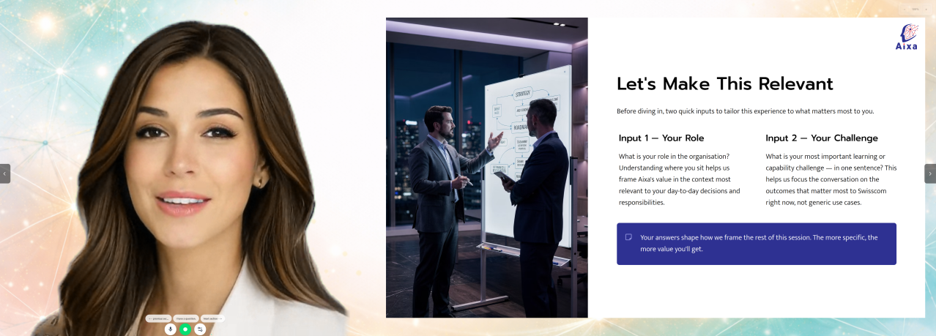
AIXA is a digital-human learning platform that helps organizations create, deliver, and measure interactive training through AI-assisted creation, avatars, voice, role-play, quizzes, feedback, analytics, and secure enterprise access.
AIXA Capability Summary
AIXA is a fully interactive, live digital-human learning platform that helps organizations turn expective, measurable learning experiences. It combines secure access, AI-assisted training creation, digital humans, voice, text, role-play, problem-solving, quizzes, feedback, analytics, and creator controls into one platform. This is not another "pre-recorded" Synthesia copycat, but a market leading Avatar and AI native interactive experience.
The platform can be understood from three perspectives: the learner or user, the creator, and the super admin.
Additionally, we have our SaaS features that includes
100% built on Microsoft Azure for security and compliance
Soc2 compliance (review underway and type 1 excpected July / August 2026)
1. Learner / User Capabilities
Learners can access the AIXA experiences they have been invited to and start each experience individually. They may enter through a direct invitation link or by logging into their account and viewing the experiences available to them.
Access can be secured through Microsoft identity management, giving organizations a familiar enterprise-grade login and access-control layer. Depending on how the creator has configured the experience, learners may access it as invited users, as members of an approved group or domain, or through a more open access model.
AIXA works across devices. Learners can use the platform on a computer or mobile phone, allowing training to happen in a flexible, accessible way.
Before starting, learners can set and test their microphone and speaker. This helps resolve connection or audio issues before the experience begins.
Depending on creator settings, learners can interact in different modes:
Text chat
Voice conversation with written content shown
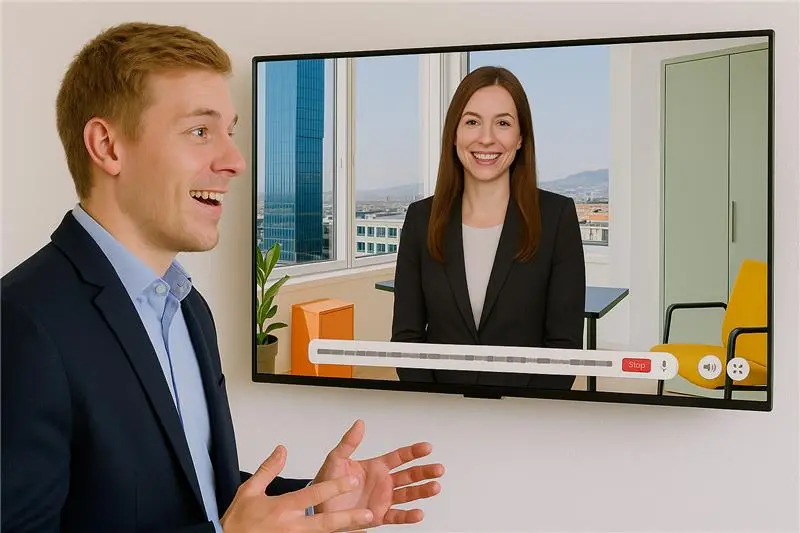
Direct digital-human avatar conversation
Learners can participate in several types of learning sections:
Information sharing, where the AI explains concepts, processes, messages, or knowledge
Information collection, where the learner provides input that can shape future responses
Feedback, where the learner receives guidance or reflection
Role-play, where the learner practises realistic conversations
Problem-solving, where the learner works through a challenge or case
Quizzes, where knowledge or understanding can be checked objectively
Where enabled by the creator, learners can also receive written feedback by email. This can summarize performance, learning points, or next steps.
Learners can personalize how AIXA addresses them. They can set their full name and email, but also choose a nickname or preferred form of address. They can adjust the name in the way they prefer.
2. Creator Capabilities
Creators can build complete learning experiences in AIXA. They can do this manually or with support from the AI creator.
In the AI-assisted creation flow, the creator defines the key elements of the training, such as the topic, goal, length, tone, style, audience, and what the learner should be able to do at the end. The AI then helps generate the training concept, structure, and individual learning sections. The creator can review, adapt, and approve the output before publishing.
AIXA supports three core learning approaches:
Light learning
For fast, accessible learning where the goal is understanding, orientation, or exposure to a topic.
Mastery learning
For capability building where learners should demonstrate that they have completed or understood one step before moving forward.
Compliance learning
Similar to mastery learning, but with final evaluations based on non-AI assessment methods such as quizzes, where objective scoring and auditability are important.
Creators can build across the main section types: information sharing, information collection, feedback, role-play, problem-solving, and quizzes.
For each training and section, creators can define many aspects of the learning experience. They can upload documents, configure variables, create system messages, define how AIXA should handle tricky questions, and adapt section-level prompts where needed. This gives creators both structure and flexibility: they can use defaults for speed, or customize deeply for precision.
Creators can also define evaluations. For role-play, problem-solving, and quiz sections, they can set mastery criteria, scoring logic, and feedback rules. Feedback can be given after a specific section or across the full training journey up to that point.
Information collected from the learner can be used to personalize later responses, making the experience feel more relevant while still keeping the training aligned with the creator’s goals.
Creators can manage access in several ways. A training can be locked to invited users, made available to specific user groups or approved domains, opened to logged-in users, or made fully open. Creators can invite learners and send reminders, for example to users who have not yet completed the training.
Creators also have access to analytics. They can review learner sessions, transcripts, evaluations, progress, and challenges. This makes it possible to understand how individuals are performing, where learners are struggling, and whether the training is achieving its intended learning outcomes.
AIXA also includes a testing capability. Creators can create test questions and gold-standard answers manually or with AI support. They can then test how the AI responds and use automated evaluation against the gold standard. This helps validate whether the training behaves as intended before it is used at scale.
Creators can create training in almost any language. They can define a main training language and enable up to three additional languages. For example, a Swiss organization could create a German training while allowing learners to ask questions in French, English, or Italian.
Creators can duplicate existing trainings, making it faster to adapt a proven experience for a new audience, topic, language, or business unit.
AIXA also supports slide-based learning. Creators can use company styling profiles, apply approved visual styles, and generate slides from several available templates. They can also copy and paste existing slide images or other visuals directly into the experience. Company profiles and styling can be made available to others in the organization.
Creators can choose from available avatars and voice options. AIXA supports different avatar approaches for different use cases:
A fast avatar option that can be created quickly from a photo
A video-to-avatar model suited to creating a closer digital twin of a real person
A photo-to-avatar model that can provide highly natural facial movement, while not always matching the exact movement patterns of the individual
Creators can also create voices with multiple emotional styles. These emotions can then be selected automatically by the AI as part of the response, helping the digital human sound more natural, expressive, and appropriate to the situation.
Creators are responsible for the usage costs associated with the learners who complete the trainings they create.
3. Super Admin Capabilities
The super admin perspective covers the controls required to manage the platform at an organizational level.
A super admin can oversee who has access to the platform, who can create trainings, and how access should be managed across users, groups, domains, and organizations.
Super admins can help control the standards used across the organization, including company templates, and shared assets and avatars. This ensures that different creators can build experiences quickly while still remaining aligned with brand, quality, and governance expectations.
Super admins can also oversee consumption data by creator or project. This is important because each training can generate platform and AI usage costs depending on how many learners complete it and which interaction modes are used, e.g., free versus premium avatars. It can also define or change the "standard available resources" to users such as GPT models or specific avatars.
Where relevant, super admins can support governaThis includes helping ensure that experiences are only available to the right users and that training content, uploaded documents, learner data, transcripts, and analytics are handled appropriately.nce around avatars, security, and individual access. Finally, user feature access can also be granularly adjusted.
The super admin role is therefore not only technical. It is also a governance role: making sure AIXA is used safely, consistently, and cost-effectively across the organization. This aspect is growing and developing the fastest, and soon will be offered not only at the Tenant Super Admin level but also at the Corporate Customer Account level within the SaaS offering.
NOTE: Near-Term Roadmap Capability
A planned capability is deck upload. This would allow creators to upload a full presentation deck, automatically convert each slide into an image for the training, and use speaker notes as the spoken text for the avatar. This would make it much faster to transform existing corporate training or leadership communication material into an interactive digital-human learning experience.
Summary
AIXA enables organizations to create, deliver, and measure interactive digital-human learning experiences.
For learners, it provides secure, flexible, personalized learning through text, voice, and avatar interaction.
For creators, it provides a powerful AI-assisted training creation environment with section types, learning modes, evaluations, analytics, reminders, language support, slides, avatars, voices, and testing.
For super admins, it provides the control layer needed to manage access, governance, consistency, cost, and organizational use.
Together, these capabilities allow organizations to move beyond static training content and create learning experiences that are more personal, practical, measurable, and scalable.